> ## Documentation Index
> Fetch the complete documentation index at: https://docs.bubblav.com/llms.txt
> Use this file to discover all available pages before exploring further.
# Attio
> Sync chat contacts and transcripts to your next-gen CRM
Seamlessly integrate BubblaV with Attio to keep your CRM data in perfect sync with your customer conversations.
> **Note**: The Attio integration requires a **Pro+ plan** or higher.
 ## Features
* **Automatic Contact Sync**: Automatically creates or updates "Person" records in Attio when a visitor provides their email.
* **Lead Capture**: Leads from newsletter signups and contact forms are instantly synced to Attio with UTM parameters and source tracking.
* **Transcript Logging**: Chat transcripts are automatically saved as "Notes" on the Person record when conversations are resolved.
* **Copilot CRM Tools**: AI Copilot can search contacts, fetch profiles, and sync data to Attio in real-time during conversations.
* **Agent Workspace Actions**: Human agents can manually search contacts, fetch profiles, and sync visitor information from the dashboard.
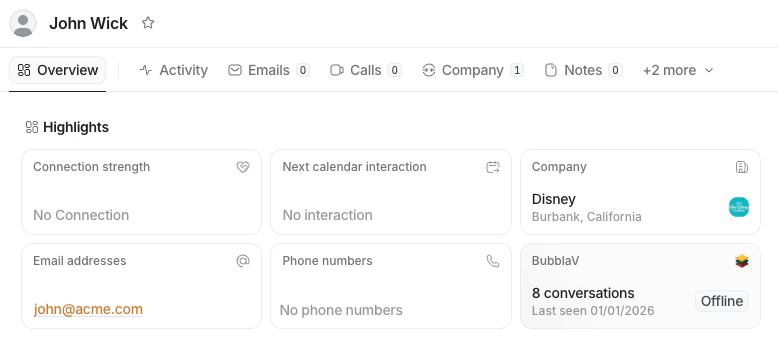
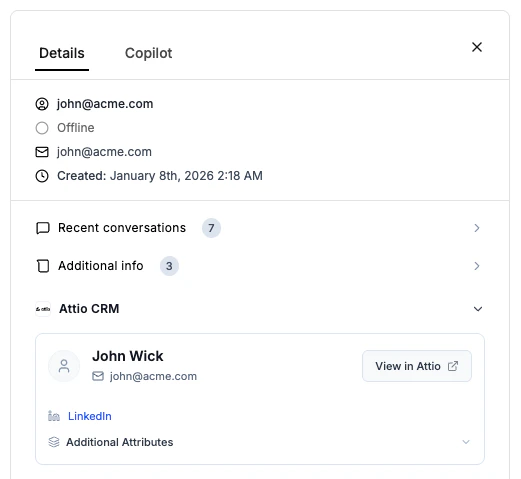
* **Visitor Insights**: View Attio profile links and details directly within the BubblaV dashboard when chatting with a visitor.
* **Configurable Sync**: Toggle contact syncing and transcript logging independently based on your workflow needs.
## Setup Guide
There are two ways to connect BubblaV to your Attio workspace:
### Option 1: From BubblaV Dashboard
Navigate to the **Integrations** tab in your BubblaV dashboard.
Find the **Attio** card and click the **Connect** button. You will be redirected to the BubblaV app in the Attio Marketplace.
In the Attio Marketplace, click **Install** or **Connect**. Follow the prompts to authorize the connection.
### Option 2: From Attio Marketplace
Search for **BubblaV** in the [Attio Marketplace](https://attio.com/apps/bubbla-v).
Click **Install**. You will be redirected to BubblaV to log in (if you aren't already) and select which website you want to connect.
Once back in Attio, click **Allow** to grant BubblaV permission to read and write records.
## Configuration
Once connected, you can configure the integration from the dashboard:
* **Sync contacts**: Automatically capture and update people in Attio from chat sessions.
* If the email exists in Attio, we update the Person.
* If it's new, we create a Person.
* **Log chat transcripts**: Attach full conversation history as Notes to contact records when conversations are resolved.
* **Reconnect**: If you connected via the legacy flow, click "Reconnect" to enable full API authorization for all features.
## Copilot Tools
When Attio is connected, AI Copilot gains access to powerful CRM tools that agents can invoke during conversations:
### `attio_search_contact`
Search for contacts in Attio by name or email address. Returns a list of matching contacts with their names, emails, and profile URLs.
### `attio_fetch_contact`
Fetch detailed information about a specific contact from Attio. Provide either an email address or a record ID to retrieve the full profile including:
* Name and email
* Job title
* Company name and domain
* Phone number
* Custom attributes
* Direct link to Attio profile
### `attio_sync_contact`
Manually sync a visitor's contact information to Attio. Creates a new Person or updates an existing one with the provided email and name.
These tools are available to human agents through the Copilot interface, allowing real-time CRM data access without leaving the conversation.
## Agent Workspace Tools
Human agents also have direct access to Attio tools from the dashboard sidebar. These tools work independently of the AI and can be used to:
* Search for existing contacts by email
* Fetch detailed contact profiles
* Manually sync visitor information to Attio
## How it Works
### Lead Capture
When a visitor fills out a newsletter signup form or contact form on your website, BubblaV automatically captures the lead and syncs it to Attio:
* **Person Record**: Creates or updates a Person record with email and name
* **UTM Parameters**: Captures source tracking data (utm\_source, utm\_medium, utm\_campaign, utm\_term, utm\_content)
* **Additional Info**: Includes company, job title, phone, and website if provided
This happens automatically in the background as soon as the form is submitted.
### Contact Syncing
When a user starts a chat and provides an email (either via the pre-chat form or during conversation), BubblaV searches your Attio workspace for a Person with that email.
* **Match Found**: We link the chat session to that Person.
* **No Match**: We create a new Person record with the `email_addresses` and `name` attributes.
This can happen automatically (if "Sync contacts" is enabled) or manually via Copilot tools.
### Chat Transcripts
When a conversation is resolved, the full transcript is posted as a **Note** to the Person record in Attio (if "Log chat transcripts" is enabled). The transcript includes:
* Timestamp for each message
* Sender identification (Visitor, Bot, or Agent name)
* Full message content
This allows your team to see the full context of the interaction directly in the CRM.
## Features
* **Automatic Contact Sync**: Automatically creates or updates "Person" records in Attio when a visitor provides their email.
* **Lead Capture**: Leads from newsletter signups and contact forms are instantly synced to Attio with UTM parameters and source tracking.
* **Transcript Logging**: Chat transcripts are automatically saved as "Notes" on the Person record when conversations are resolved.
* **Copilot CRM Tools**: AI Copilot can search contacts, fetch profiles, and sync data to Attio in real-time during conversations.
* **Agent Workspace Actions**: Human agents can manually search contacts, fetch profiles, and sync visitor information from the dashboard.
* **Visitor Insights**: View Attio profile links and details directly within the BubblaV dashboard when chatting with a visitor.
* **Configurable Sync**: Toggle contact syncing and transcript logging independently based on your workflow needs.
## Setup Guide
There are two ways to connect BubblaV to your Attio workspace:
### Option 1: From BubblaV Dashboard
Navigate to the **Integrations** tab in your BubblaV dashboard.
Find the **Attio** card and click the **Connect** button. You will be redirected to the BubblaV app in the Attio Marketplace.
In the Attio Marketplace, click **Install** or **Connect**. Follow the prompts to authorize the connection.
### Option 2: From Attio Marketplace
Search for **BubblaV** in the [Attio Marketplace](https://attio.com/apps/bubbla-v).
Click **Install**. You will be redirected to BubblaV to log in (if you aren't already) and select which website you want to connect.
Once back in Attio, click **Allow** to grant BubblaV permission to read and write records.
## Configuration
Once connected, you can configure the integration from the dashboard:
* **Sync contacts**: Automatically capture and update people in Attio from chat sessions.
* If the email exists in Attio, we update the Person.
* If it's new, we create a Person.
* **Log chat transcripts**: Attach full conversation history as Notes to contact records when conversations are resolved.
* **Reconnect**: If you connected via the legacy flow, click "Reconnect" to enable full API authorization for all features.
## Copilot Tools
When Attio is connected, AI Copilot gains access to powerful CRM tools that agents can invoke during conversations:
### `attio_search_contact`
Search for contacts in Attio by name or email address. Returns a list of matching contacts with their names, emails, and profile URLs.
### `attio_fetch_contact`
Fetch detailed information about a specific contact from Attio. Provide either an email address or a record ID to retrieve the full profile including:
* Name and email
* Job title
* Company name and domain
* Phone number
* Custom attributes
* Direct link to Attio profile
### `attio_sync_contact`
Manually sync a visitor's contact information to Attio. Creates a new Person or updates an existing one with the provided email and name.
These tools are available to human agents through the Copilot interface, allowing real-time CRM data access without leaving the conversation.
## Agent Workspace Tools
Human agents also have direct access to Attio tools from the dashboard sidebar. These tools work independently of the AI and can be used to:
* Search for existing contacts by email
* Fetch detailed contact profiles
* Manually sync visitor information to Attio
## How it Works
### Lead Capture
When a visitor fills out a newsletter signup form or contact form on your website, BubblaV automatically captures the lead and syncs it to Attio:
* **Person Record**: Creates or updates a Person record with email and name
* **UTM Parameters**: Captures source tracking data (utm\_source, utm\_medium, utm\_campaign, utm\_term, utm\_content)
* **Additional Info**: Includes company, job title, phone, and website if provided
This happens automatically in the background as soon as the form is submitted.
### Contact Syncing
When a user starts a chat and provides an email (either via the pre-chat form or during conversation), BubblaV searches your Attio workspace for a Person with that email.
* **Match Found**: We link the chat session to that Person.
* **No Match**: We create a new Person record with the `email_addresses` and `name` attributes.
This can happen automatically (if "Sync contacts" is enabled) or manually via Copilot tools.
### Chat Transcripts
When a conversation is resolved, the full transcript is posted as a **Note** to the Person record in Attio (if "Log chat transcripts" is enabled). The transcript includes:
* Timestamp for each message
* Sender identification (Visitor, Bot, or Agent name)
* Full message content
This allows your team to see the full context of the interaction directly in the CRM.
 ### Visitor Insights
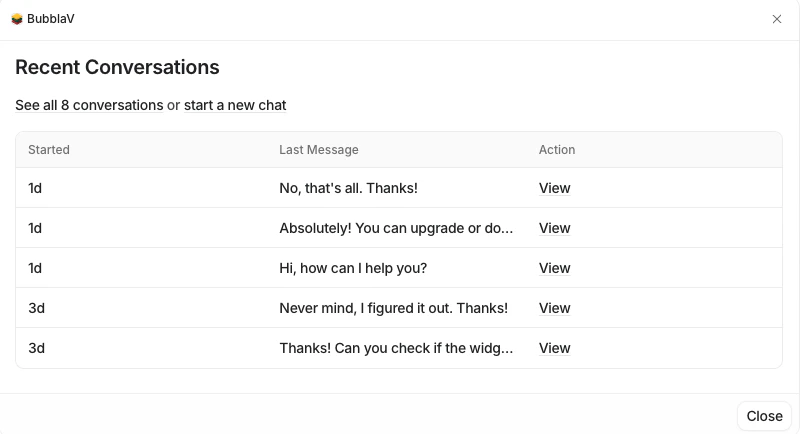
When a support agent views a visitor in the BubblaV dashboard, we look up that email in Attio. If a match is found, we display:
* A link to their Attio profile
* Key contact details like name and company
* Option to sync the contact if not already in Attio
### Visitor Insights
When a support agent views a visitor in the BubblaV dashboard, we look up that email in Attio. If a match is found, we display:
* A link to their Attio profile
* Key contact details like name and company
* Option to sync the contact if not already in Attio
 ### Real-Time CRM Access
Agents can use Copilot tools or workspace actions to:
* Search for contacts without leaving the chat
* Fetch complete profile information on demand
* Sync new or updated contact information instantly
### Real-Time CRM Access
Agents can use Copilot tools or workspace actions to:
* Search for contacts without leaving the chat
* Fetch complete profile information on demand
* Sync new or updated contact information instantly