> ## Documentation Index
> Fetch the complete documentation index at: https://docs.bubblav.com/llms.txt
> Use this file to discover all available pages before exploring further.
# Website Crawling
> Automatically train your bot on your website content
Website crawling is the easiest way to train your chatbot. BubblaV scans your pages, extracts content, and makes it searchable so your bot can answer questions accurately.
## Adding Your Main Website
When you create a new website in your dashboard, you'll be prompted to enter your main website URL. The crawling process starts automatically after you add the website.
**To add a main website later:**
Go to **Knowledge** → **Websites**
Type your website URL (e.g., `https://example.com`)
Click **Add** - crawling begins automatically in the background
Check the **Knowledge** → **Pages** section to see crawling progress. No manual start is needed.
Once crawling completes, check the list of crawled pages and disable any you don't want
***
## How Crawling Works
When you add a website or sub-website, BubblaV automatically starts crawling:
1. **Checks for llms-full.txt** - looks for AI-optimized content first
2. **Falls back to sitemap** if llms-full.txt not available
3. **Visits your URL** and extracts all text content
4. **Follows links** to discover other pages on your domain
5. **Processes content** into searchable chunks with embeddings
6. **Updates status** for each page (Crawled, Pending, Failed)
If your site has an llms-full.txt file, steps 3-4 are skipped - we use the pre-organized content directly.
Crawling respects your `robots.txt` file. Pages blocked there won't be crawled.
***
## AI-Optimized Content (llms-full.txt)
BubblaV automatically detects and uses the [llms.txt standard](https://llmstxt.org/) when available. This is an emerging standard for providing AI-ready documentation.
### What is llms-full.txt?
Many modern documentation sites now provide a `/llms-full.txt` file - a single file containing all their documentation in a structured format. Major companies like Anthropic, Vercel, and Stripe use this format.
### How BubblaV Uses It
When you add a website, BubblaV checks for `/llms-full.txt` first:
1. **If llms-full.txt exists**: Content is extracted directly from this file, no page-by-page crawling needed
2. **If llms-full.txt doesn't exist**: Falls back to standard sitemap-based crawling
Websites with llms-full.txt are crawled faster and more efficiently, as we don't need to fetch individual pages.
### Benefits
| Feature | llms-full.txt | Traditional Crawling |
| ------------ | --------------------- | ---------------------- |
| Speed | Instant (single file) | Slower (many requests) |
| Completeness | All docs in one file | May miss pages |
| Structure | Pre-organized | Extracted from HTML |
| Updates | Automatic detection | Based on sitemap |
### Incremental Updates
For sites with llms-full.txt:
* We store a fingerprint of the file
* During incremental crawls, we check if the file changed
* Only re-process if content is updated
* This is more efficient than checking each page
You don't need to configure anything - llms-full.txt detection is automatic.
### Checking if Your Site Supports It
Visit `https://yoursite.com/llms-full.txt` in your browser. If it loads, your site supports this feature.
Popular documentation platforms that support llms-full.txt:
* Mintlify
* GitBook
* Docusaurus (with plugin)
* ReadMe
***
## Adding More Content Sources
### Sub-websites
**What is a sub-website?**
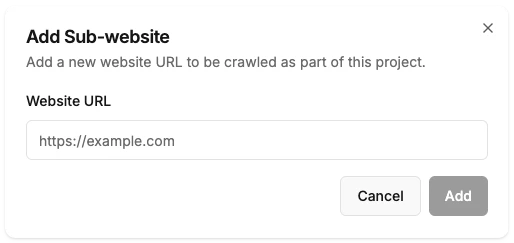
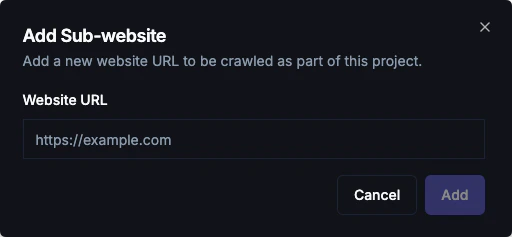
A sub-website is an additional website or domain that you want to include in your knowledge base alongside your main website. This allows you to train your chatbot on content from multiple related sites.
**To add a sub-website:**
1. Go to **Knowledge** → **Websites**
2. Click **Add Website**
3. Enter the sub-website URL (e.g., `https://blog.example.com`)
4. Click **Add** - crawling starts automatically
 **Use cases:**
* Blog on a subdomain (e.g., `https://blog.example.com`)
* Help center on a different domain
* Regional or language-specific sites
* Multiple related websites you want to include in one knowledge base
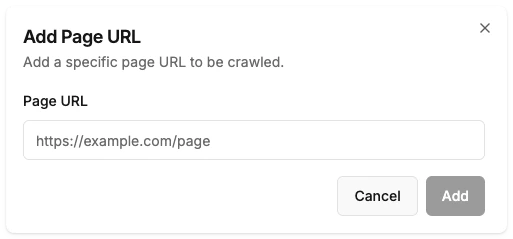
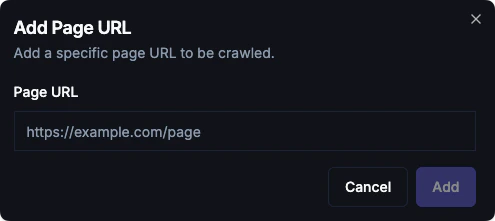
### Individual Pages
Add specific URLs that aren't linked from your main site:
1. Go to **Knowledge** → **Pages**
2. Click **Add Page**
3. Paste the full URL
4. Click **Add** - the page will be crawled automatically
**Use cases:**
* Blog on a subdomain (e.g., `https://blog.example.com`)
* Help center on a different domain
* Regional or language-specific sites
* Multiple related websites you want to include in one knowledge base
### Individual Pages
Add specific URLs that aren't linked from your main site:
1. Go to **Knowledge** → **Pages**
2. Click **Add Page**
3. Paste the full URL
4. Click **Add** - the page will be crawled automatically
 **Use cases:**
* Landing pages
* PDF documents hosted online
* Specific product pages
### Sitemap Import
Import all URLs from your sitemap at once:
1. Go to **Knowledge** → **Websites**
2. Scroll to the **Sitemaps & LLMs** section
3. Click **Add URL**
4. Enter your sitemap URL (e.g., `https://example.com/sitemap.xml`)
5. Click **Add**
**Use cases:**
* Landing pages
* PDF documents hosted online
* Specific product pages
### Sitemap Import
Import all URLs from your sitemap at once:
1. Go to **Knowledge** → **Websites**
2. Scroll to the **Sitemaps & LLMs** section
3. Click **Add URL**
4. Enter your sitemap URL (e.g., `https://example.com/sitemap.xml`)
5. Click **Add**
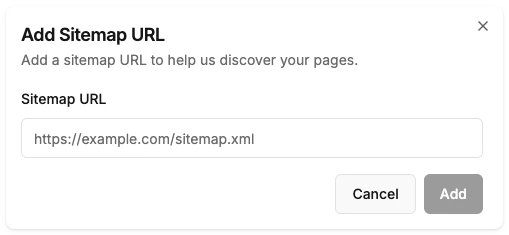
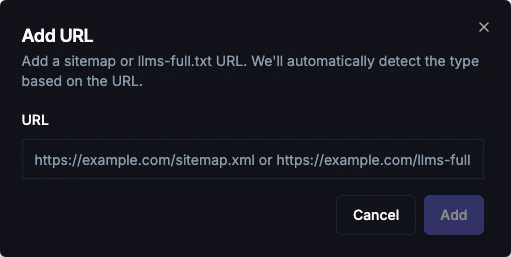 All URLs in the sitemap will be automatically queued for crawling.
***
## Managing Crawled Pages
### Enable/Disable Pages
Toggle pages on/off to control what the bot knows:
* **Enabled**: Bot can use this content to answer questions
* **Disabled**: Content is stored but not used
Disable pages like login, cart, checkout, and privacy policy that shouldn't influence answers.
### Delete Pages
Permanently remove pages from your knowledge base:
1. Find the page in the list
2. Click the delete icon
3. Confirm deletion
***
## Automatic Incremental Crawling
BubblaV automatically performs incremental crawls to keep your knowledge base up to date. The system detects changes on your website and only crawls new or updated pages, making the process efficient and fast.
**How it works:**
* The system monitors your websites for changes
* New pages are automatically discovered and crawled
* Updated pages are re-indexed when changes are detected
* No manual action is required
**Sync frequency by plan:**
| Plan | Auto Sync |
| ---- | ----------- |
| Free | Manual only |
| Pro | Weekly |
Incremental crawls run automatically in the background. You don't need to manually trigger re-crawls.
***
## Plan Page Limits
| Plan | Max Pages (Total) |
| -------- | ----------------- |
| **Free** | 50 pages |
| **Pro** | 5,000 pages |
"Total Pages" includes:
* Crawled Web Pages
* Uploaded Files (1 file = 1 page)
* Q\&A Entries (1 entry = 1 page)
When you hit your limit, new pages won't be crawled and you won't be able to upload files. [Upgrade your plan](https://www.bubblav.com/pricing) for more capacity.
***
## Best Practices
Crawl product pages, FAQs, and support content first. These have the highest impact on customer satisfaction.
Login, registration, cart, and checkout pages don't help answer customer questions.
The system automatically performs incremental crawls to detect and index new or updated content. For major updates, the automatic sync will pick up changes based on your plan's frequency.
Review failed pages to ensure important content isn't missing. Fix issues on your website if needed.
If you control the website being crawled, consider adding an llms-full.txt file. This provides:
* Faster initial crawling
* Better organized content
* More efficient incremental updates
Learn more at [llmstxt.org](https://llmstxt.org/).
***
## Troubleshooting
* Ensure pages are linked from your main site
* Check your sitemap includes all pages
* Add pages manually via the Pages tab
* Verify page has visible text (not just images)
* Check JavaScript-rendered content is server-side rendered
* Contact support for complex pages
* Large sites may take hours to fully crawl
* Check progress in the dashboard
* Pages are usable as soon as they're crawled
* Verify the file is accessible at `https://yoursite.com/llms-full.txt`
* Check that it returns a 200 status (not redirect or error)
* Ensure the file has valid markdown content
* If recently added, trigger a re-crawl to detect it
***
## Next Steps
Add question and answer pairs
Identify unanswered customer questions
All URLs in the sitemap will be automatically queued for crawling.
***
## Managing Crawled Pages
### Enable/Disable Pages
Toggle pages on/off to control what the bot knows:
* **Enabled**: Bot can use this content to answer questions
* **Disabled**: Content is stored but not used
Disable pages like login, cart, checkout, and privacy policy that shouldn't influence answers.
### Delete Pages
Permanently remove pages from your knowledge base:
1. Find the page in the list
2. Click the delete icon
3. Confirm deletion
***
## Automatic Incremental Crawling
BubblaV automatically performs incremental crawls to keep your knowledge base up to date. The system detects changes on your website and only crawls new or updated pages, making the process efficient and fast.
**How it works:**
* The system monitors your websites for changes
* New pages are automatically discovered and crawled
* Updated pages are re-indexed when changes are detected
* No manual action is required
**Sync frequency by plan:**
| Plan | Auto Sync |
| ---- | ----------- |
| Free | Manual only |
| Pro | Weekly |
Incremental crawls run automatically in the background. You don't need to manually trigger re-crawls.
***
## Plan Page Limits
| Plan | Max Pages (Total) |
| -------- | ----------------- |
| **Free** | 50 pages |
| **Pro** | 5,000 pages |
"Total Pages" includes:
* Crawled Web Pages
* Uploaded Files (1 file = 1 page)
* Q\&A Entries (1 entry = 1 page)
When you hit your limit, new pages won't be crawled and you won't be able to upload files. [Upgrade your plan](https://www.bubblav.com/pricing) for more capacity.
***
## Best Practices
Crawl product pages, FAQs, and support content first. These have the highest impact on customer satisfaction.
Login, registration, cart, and checkout pages don't help answer customer questions.
The system automatically performs incremental crawls to detect and index new or updated content. For major updates, the automatic sync will pick up changes based on your plan's frequency.
Review failed pages to ensure important content isn't missing. Fix issues on your website if needed.
If you control the website being crawled, consider adding an llms-full.txt file. This provides:
* Faster initial crawling
* Better organized content
* More efficient incremental updates
Learn more at [llmstxt.org](https://llmstxt.org/).
***
## Troubleshooting
* Ensure pages are linked from your main site
* Check your sitemap includes all pages
* Add pages manually via the Pages tab
* Verify page has visible text (not just images)
* Check JavaScript-rendered content is server-side rendered
* Contact support for complex pages
* Large sites may take hours to fully crawl
* Check progress in the dashboard
* Pages are usable as soon as they're crawled
* Verify the file is accessible at `https://yoursite.com/llms-full.txt`
* Check that it returns a 200 status (not redirect or error)
* Ensure the file has valid markdown content
* If recently added, trigger a re-crawl to detect it
***
## Next Steps
Add question and answer pairs
Identify unanswered customer questions