
Overview
The Polar integration enables your AI chatbot to answer subscription-related questions by connecting to your Polar.sh organization. Customers can check their subscription status, view order history, access benefits, and manage their subscriptions through natural conversation.Features
Visitor Insights for Support Agents
The Polar integration provides support agents with real-time data in the Visitor Insight panel within the BubblaV dashboard. This allows agents to: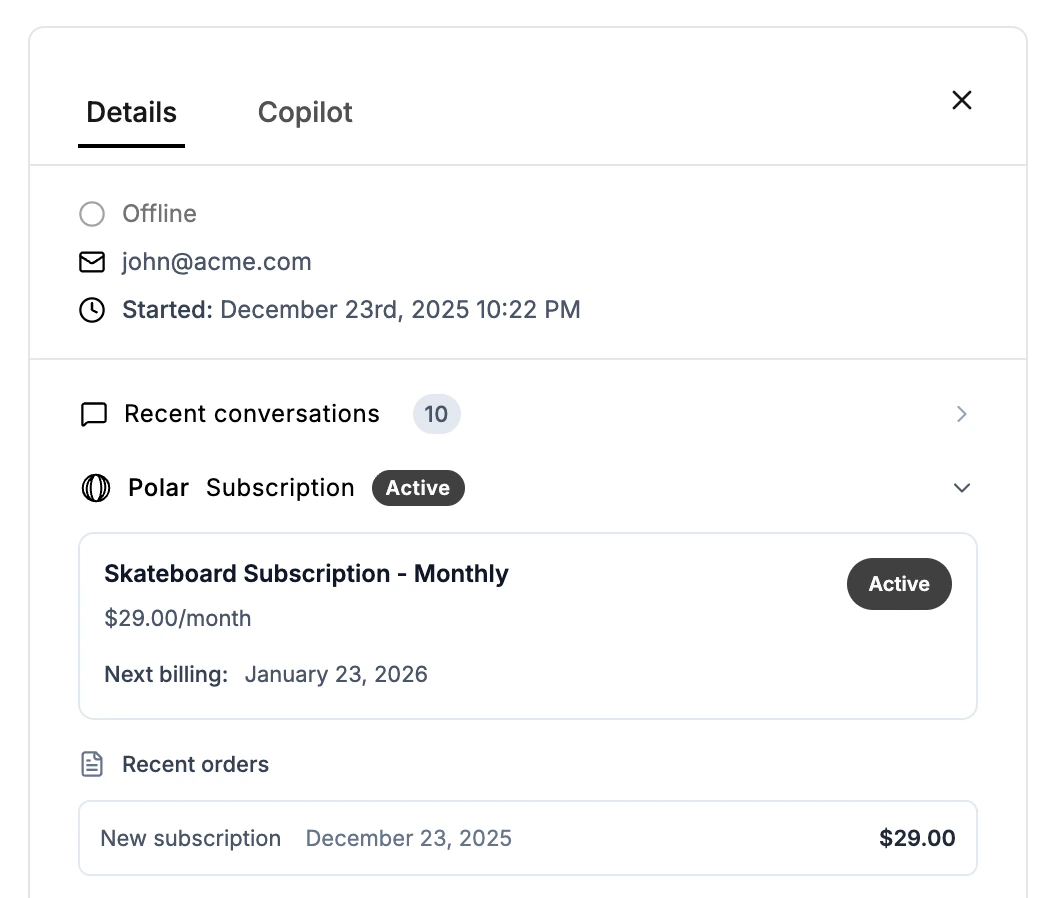
- Identify Plan Tier: Instantly see if the customer has an active Pro or other subscription tier.
- Check Subscription Status: See the current status (Active, Canceled, etc.) and next billing period.
- View Order History: Access a quick history of recent Polar orders and payments.
- Manage Benefits: See which specific benefits (downloads, Discord access, license keys) the customer has active.
Setup
Step 1: Get Your Polar Organization Access Token
- Log in to Polar.sh
- Go to Settings → General → Developers
- Click New Token
- Give your token a name (e.g., “BubblaV Chatbot”)
- Select the following scopes:
- Click Create and copy the token (starts with
polar_)
Step 2: Connect in BubblaV
- Go to your BubblaV dashboard
- Navigate to Integrations
- Click Connect on the Polar card
- Paste your API key
- Enable Test Mode if using sandbox credentials
- Click Save
Customer Identification
Customers are identified by their email address. When a customer asks a subscription question, the chatbot:- Verifies the customer’s email
- Looks up the matching customer record in Polar
- Returns subscription and billing information
Available Tools
Get Subscription Status
Returns the customer’s current subscription plan, status, and next billing date.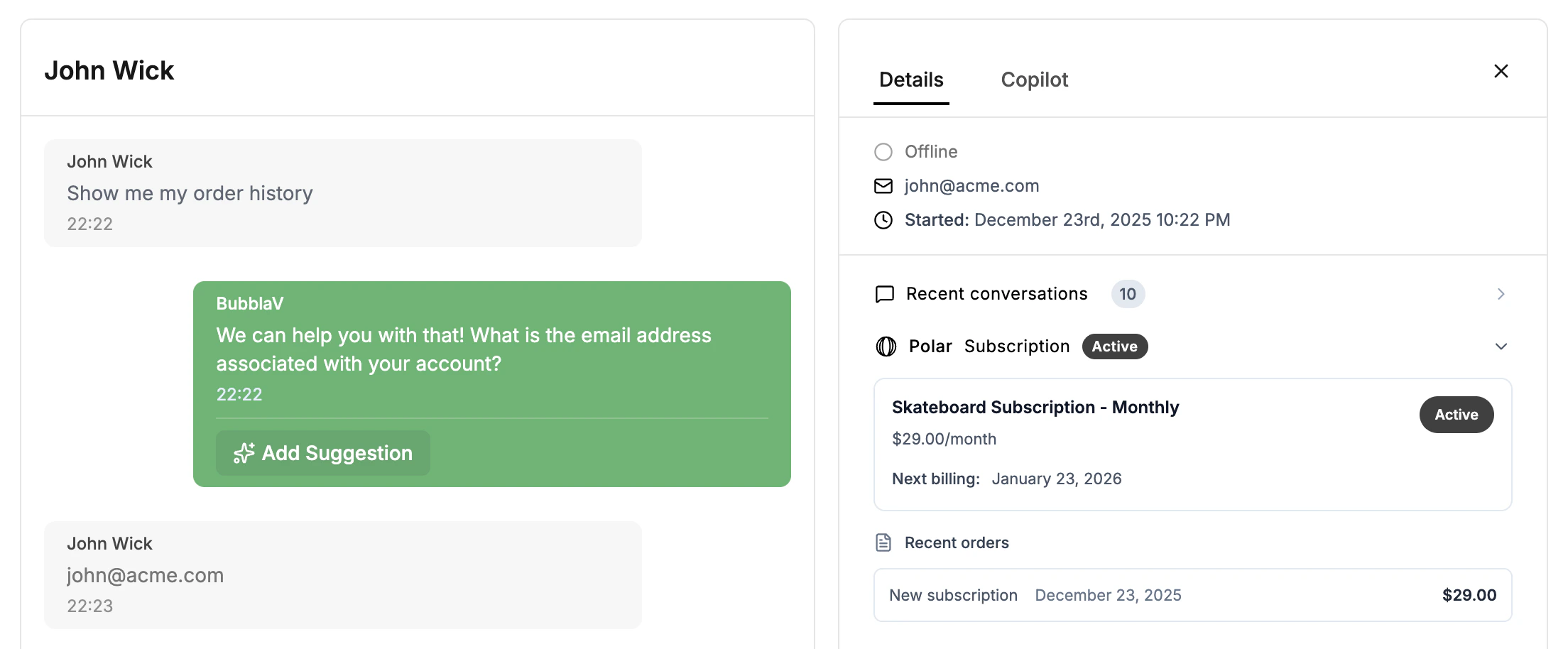
- Customer: “What’s my subscription status?”
- AI: “You have an active Pro subscription at $49/month ($39/month when billed annually). Your next billing date is January 15, 2025.”
Get Order History
Retrieves recent orders including subscription payments and one-time purchases. Example conversation:- Customer: “Show me my recent orders”
- AI: “Here are your last 5 orders: Renewal - $49.00 (Dec 15), Renewal - $49.00 (Nov 15)…”
Get Customer Portal Link
Generates a secure link to the Polar customer portal for self-service management. Example conversation:- Customer: “I want to update my payment method”
- AI: “Here’s your customer portal link: [link]. You can update your payment method and manage your subscription there.”
Get Benefits
Lists all benefits granted to the customer, including downloads, Discord access, and license keys. Example conversation:- Customer: “What benefits do I have?”
- AI: “You have 3 active benefits: Discord Access, Premium Templates (Download), License Key: PRO-XXXX”
Get Products
Lists all available products and their pricing. Example conversation:- Customer: “What plans are available?”
- AI: “We offer: Free at $0/month, Pro at $49/month ($39/month annually) with a 14-day free trial”
Manage Subscription
Provides a secure customer portal link for self-service subscription management. Customers can cancel, change their plan, or update payment methods through the portal. Example conversation:- Customer: “I want to cancel my subscription”
- AI: “Here’s your secure customer portal where you can manage your subscription: [link]. You have full control over cancellations and plan changes there.”
Security
- Read-only by default: Most operations are read-only
- Email verification: Customers must verify their email before accessing data
- Encrypted credentials: API keys are encrypted at rest
- No sensitive data exposure: Card numbers and payment details are never shown
Sandbox Mode
Enable Test Mode when connecting to use Polar’s sandbox environment. This is useful for:- Testing the integration before going live
- Development and staging environments
FAQ
How are customers verified?
How are customers verified?
Customers are verified by their email address. The chatbot looks up the email in your Polar organization’s customer list.
How does subscription cancellation work?
How does subscription cancellation work?
The chatbot provides a secure portal link where customers can manage their own subscriptions, including cancellations. This gives customers full control and transparency over their account changes.
What if a customer doesn't have an account?
What if a customer doesn't have an account?
If no customer record is found, the chatbot will inform them that no subscription was found for their email.
Is my API key secure?
Is my API key secure?
Yes, API keys are encrypted at rest and never exposed in logs or error messages.
Troubleshooting
”No customer found”
This means the email address doesn’t match any customer in your Polar organization. Verify the customer is using the same email they signed up with.”Invalid API key”
Check that:- Your API key starts with
polar_ - You’re using the correct environment (production vs sandbox)
- The token has the required scopes
”Unable to retrieve data”
This could indicate:- Network connectivity issues
- Polar API rate limiting
- Missing API permissions
”403 Forbidden” or “insufficient_scope” when generating customer portal links
This error occurs when your API key doesn’t have the required scope for creating customer sessions. To fix:- Go to Polar.sh → Settings → General → Developers
- Create a new token (don’t edit the existing one) with one of these scopes enabled:
customer_sessions:write(most common)customer_portal:write(alternative name in some accounts)
- Copy the new token and update the integration in BubblaV