
Scope note: Attio provides CRM contact context — contact sync, transcript notes, and visitor insights. It does not sync support tickets into the Live Support inbox (Attio has no ticketing API). For ticket sync, use the HubSpot or Zendesk integration.
Note: The Attio integration requires a Pro+ plan or higher.
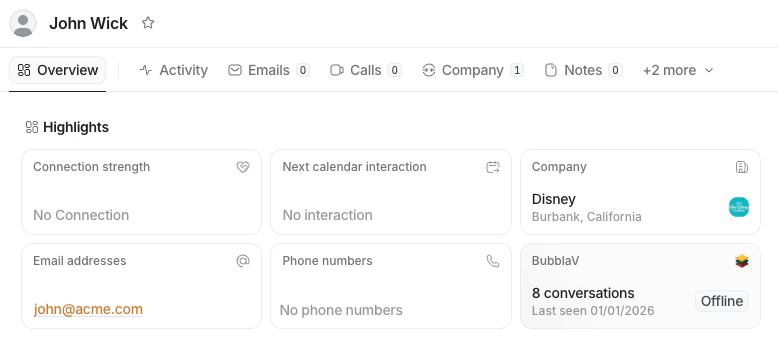
Features
- Automatic Contact Sync: Automatically creates or updates “Person” records in Attio when a visitor provides their email.
- Lead Capture: Leads from newsletter signups and contact forms are instantly synced to Attio with UTM parameters and source tracking.
- Transcript Logging: Chat transcripts are automatically saved as “Notes” on the Person record when conversations are resolved.
- Copilot CRM Tools: AI Copilot can search contacts, fetch profiles, and sync data to Attio in real-time during conversations.
- Agent Workspace Actions: Human agents can manually search contacts, fetch profiles, and sync visitor information from the dashboard.
- Visitor Insights: View Attio profile links and details directly within the BubblaV dashboard when chatting with a visitor.
- Two-Way Sync: Contact detail changes made in Attio (name, job title, company, phone, description) sync back into the BubblaV visitor profile automatically.
- Configurable Sync: Toggle contact syncing and transcript logging independently based on your workflow needs.
- Custom Attribute Mapping: Map visitor and form fields to your own Attio attributes — standard or custom — so lead capture writes exactly the data you care about.
Setup Guide
There are two ways to connect BubblaV to your Attio workspace:Option 1: From BubblaV Dashboard
1
Go to Integrations
Navigate to the Integrations tab in your BubblaV dashboard.
2
Connect Attio
Find the Attio card and click the Connect button. You will be redirected to the BubblaV app in the Attio Marketplace.
3
Install App
In the Attio Marketplace, click Install or Connect. Follow the prompts to authorize the connection.
Option 2: From Attio Marketplace
1
Find BubblaV
Search for BubblaV in the Attio Marketplace.
2
Install
Click Install. You will be redirected to BubblaV to log in (if you aren’t already) and select which website you want to connect.
3
Authorize
Once back in Attio, click Allow to grant BubblaV permission to read and write records.
Configuration
Once connected, you can configure the integration from the dashboard:- Sync contacts: Automatically capture and update people in Attio from chat sessions.
- If the email exists in Attio, we update the Person.
- If it’s new, we create a Person.
- Log chat transcripts: Attach full conversation history as Notes to contact records when conversations are resolved.
- Custom attribute mapping: Map visitor and form fields to your own Attio attributes.
Custom attribute mapping
In Integrations → Attio → Custom attribute mapping, map any visitor or form field (for exampleutm_source, company, or one of your own form field names) to any writable Attio attribute — standard or custom. The mapped value is written to the Person record whenever a lead is captured.
- Pick the Attio attribute from the dropdown, loaded straight from your workspace. If the list can’t be loaded, type the attribute slug directly.
- Select/status values must already exist as options in Attio — unmatched options are skipped.
- Mappings override the built-in defaults (UTM parameters, lead source, company, job title, phone, website) when both target the same attribute.
Copilot Tools
When Attio is connected, AI Copilot gains access to powerful CRM tools that agents can invoke during conversations:attio_search_contact
Search for contacts in Attio by name or email address. Returns a list of matching contacts with their names, emails, and profile URLs.
attio_fetch_contact
Fetch detailed information about a specific contact from Attio. Provide either an email address or a record ID to retrieve the full profile including:
- Name and email
- Job title
- Company name and domain
- Phone number
- Custom attributes
- Direct link to Attio profile
attio_sync_contact
Manually sync a visitor’s contact information to Attio. Creates a new Person or updates an existing one with the provided email and name.
These tools are available to human agents through the Copilot interface, allowing real-time CRM data access without leaving the conversation.
Agent Workspace Tools
Human agents also have direct access to Attio tools from the dashboard sidebar. These tools work independently of the AI and can be used to:- Search for existing contacts by email
- Fetch detailed contact profiles
- Manually sync visitor information to Attio
How it Works
Lead Capture
When a visitor fills out a newsletter signup form or contact form on your website, BubblaV automatically captures the lead and syncs it to Attio:- Person Record: Creates or updates a Person record with email and name
- UTM Parameters: Captures source tracking data (utm_source, utm_medium, utm_campaign, utm_term, utm_content)
- Additional Info: Includes company, job title, phone, and website if provided
Contact Syncing
When a user starts a chat and provides an email (either via the pre-chat form or during conversation), BubblaV searches your Attio workspace for a Person with that email.- Match Found: We link the chat session to that Person.
- No Match: We create a new Person record with the
email_addressesandnameattributes.
Chat Transcripts
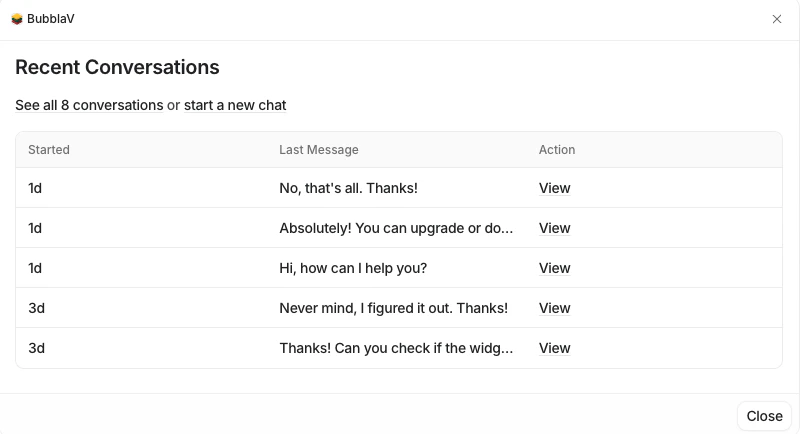
When a conversation is resolved, the full transcript is posted as a Note to the Person record in Attio (if “Log chat transcripts” is enabled). The transcript includes:- Timestamp for each message
- Sender identification (Visitor, Bot, or Agent name)
- Full message content
Visitor Insights
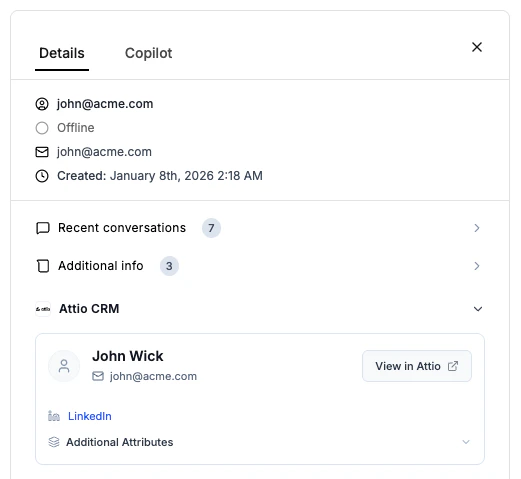
When a support agent views a visitor in the BubblaV dashboard, we look up that email in Attio. If a match is found, we display:- A link to their Attio profile
- Key contact details like name and company
- Option to sync the contact if not already in Attio
Real-Time CRM Access
Agents can use Copilot tools or workspace actions to:- Search for contacts without leaving the chat
- Fetch complete profile information on demand
- Sync new or updated contact information instantly